ATD Dual DC
Lab Details
AVD Version: 5.7.2
cEOS-lab: 4.34.2F
Containerlab: 0.71.1
How To Run The Lab
Arista Community Lab runs in a cloud-based lab environment sponsored by Arista 1. To get started, sign in at labs.arista.com and click the button below to launch the lab.
All lab files are also available for download if you want to run the lab on your own machine . This option is intended for experienced users who can manage the environment without extra support.
Lab Inventory
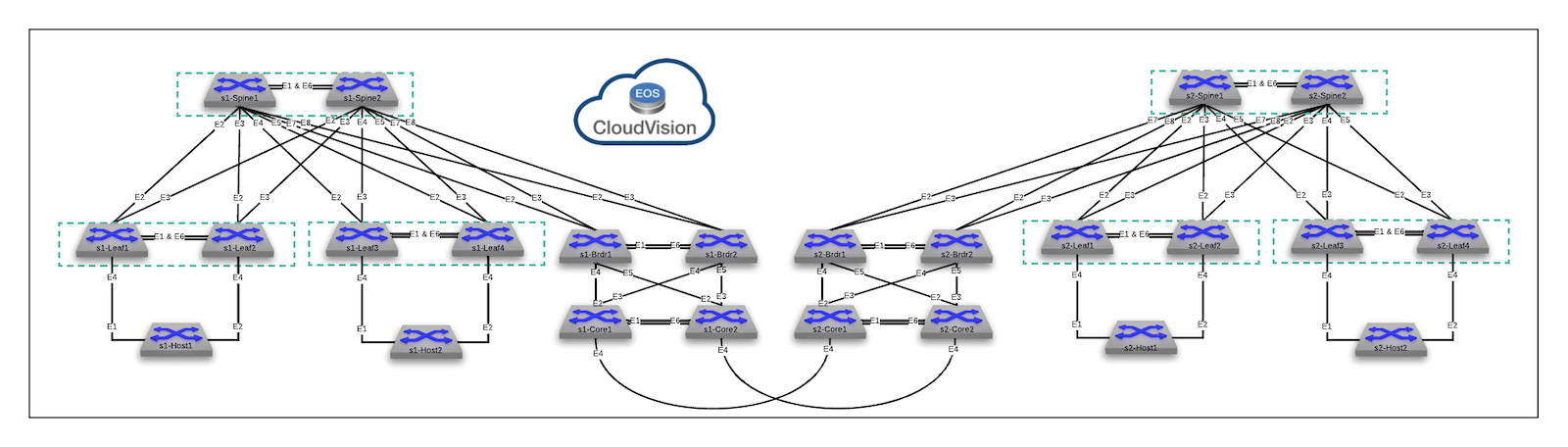
This lab has the following devices:
| Hostname | Type | OS | Management Address | Username | Password |
|---|---|---|---|---|---|
| s1-spine1 | switch | cEOS-lab, 4.34.2F | 192.168.0.10 | arista | arista |
| s1-spine2 | switch | cEOS-lab, 4.34.2F | 192.168.0.11 | arista | arista |
| s1-leaf1 | switch | cEOS-lab, 4.34.2F | 192.168.0.12 | arista | arista |
| s1-leaf2 | switch | cEOS-lab, 4.34.2F | 192.168.0.13 | arista | arista |
| s1-leaf3 | switch | cEOS-lab, 4.34.2F | 192.168.0.14 | arista | arista |
| s1-leaf4 | switch | cEOS-lab, 4.34.2F | 192.168.0.15 | arista | arista |
| s1-brdr1 | switch | cEOS-lab, 4.34.2F | 192.168.0.100 | arista | arista |
| s1-brdr2 | switch | cEOS-lab, 4.34.2F | 192.168.0.101 | arista | arista |
| s1-core1 | switch | cEOS-lab, 4.34.2F | 192.168.0.102 | arista | arista |
| s1-core2 | switch | cEOS-lab, 4.34.2F | 192.168.0.103 | arista | arista |
| s2-spine1 | switch | cEOS-lab, 4.34.2F | 192.168.0.20 | arista | arista |
| s2-spine2 | switch | cEOS-lab, 4.34.2F | 192.168.0.21 | arista | arista |
| s2-leaf1 | switch | cEOS-lab, 4.34.2F | 192.168.0.22 | arista | arista |
| s2-leaf2 | switch | cEOS-lab, 4.34.2F | 192.168.0.23 | arista | arista |
| s2-leaf3 | switch | cEOS-lab, 4.34.2F | 192.168.0.24 | arista | arista |
| s2-leaf4 | switch | cEOS-lab, 4.34.2F | 192.168.0.25 | arista | arista |
| s2-brdr1 | switch | cEOS-lab, 4.34.2F | 192.168.0.200 | arista | arista |
| s2-brdr2 | switch | cEOS-lab, 4.34.2F | 192.168.0.201 | arista | arista |
| s2-core1 | switch | cEOS-lab, 4.34.2F | 192.168.0.202 | arista | arista |
| s2-core2 | switch | cEOS-lab, 4.34.2F | 192.168.0.203 | arista | arista |
| s1-host1 | host | cEOS-lab, 4.34.2F | 192.168.0.16 | arista | arista |
| s1-host2 | host | cEOS-lab, 4.34.2F | 192.168.0.17 | arista | arista |
| s2-host1 | host | cEOS-lab, 4.34.2F | 192.168.0.26 | arista | arista |
| s2-host2 | host | cEOS-lab, 4.34.2F | 192.168.0.27 | arista | arista |
To access any device, use
ssh <username>@<hostname>or simply type<hostname>to use the SSH alias.
Last Updated
Last reviewed: 21/05/2026
Demos and labs reviewed more than 6 months ago may be outdated.
-
GitHub Codespaces support was removed due to platform restrictions. Use labs.arista.com instead; it is available to all users with an arista.com account. ↩